Ask anything.
Watch it explained.
Elucify turns your AI assistant's answer into a narrated, animated explanation: diagrams draw themselves, graphs move and a voice talks you through it, playing in your browser while it's still being written.
Not just for code
Three explanations made with Elucify. Each is under a minute, narrated, and plays in your browser. No sign-in needed to watch.
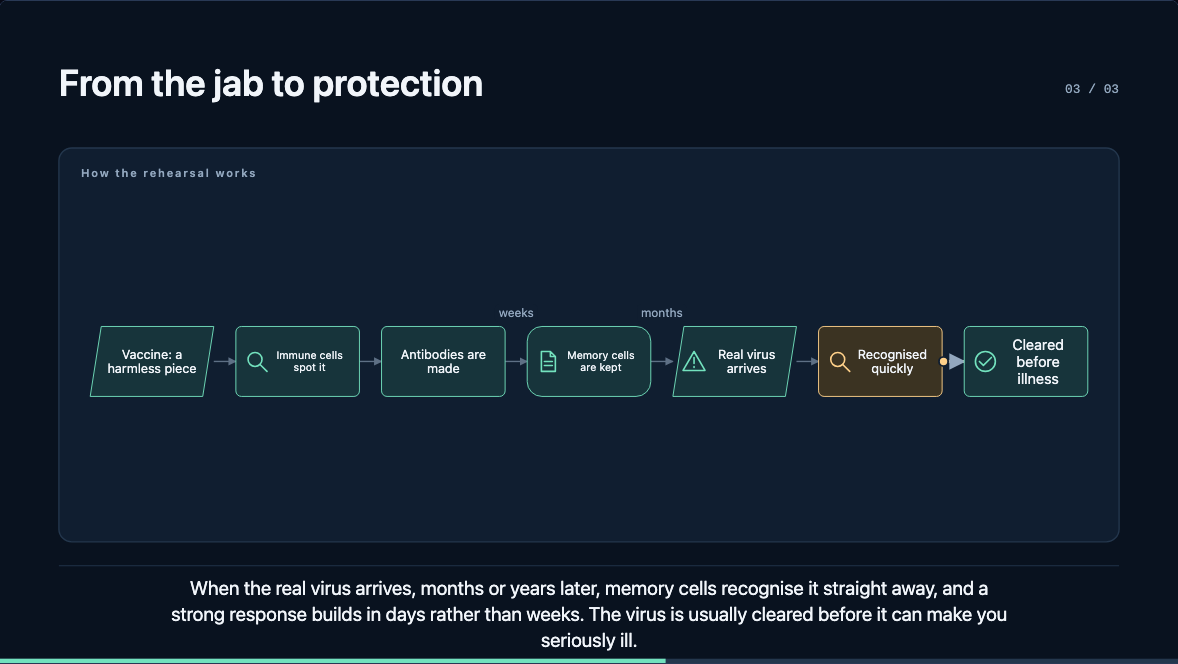
How a vaccine teaches your body to fight
A flowchart a marker travels along, then why a remembered virus is beaten faster.
Watch, 56 s (opens in a new tab)
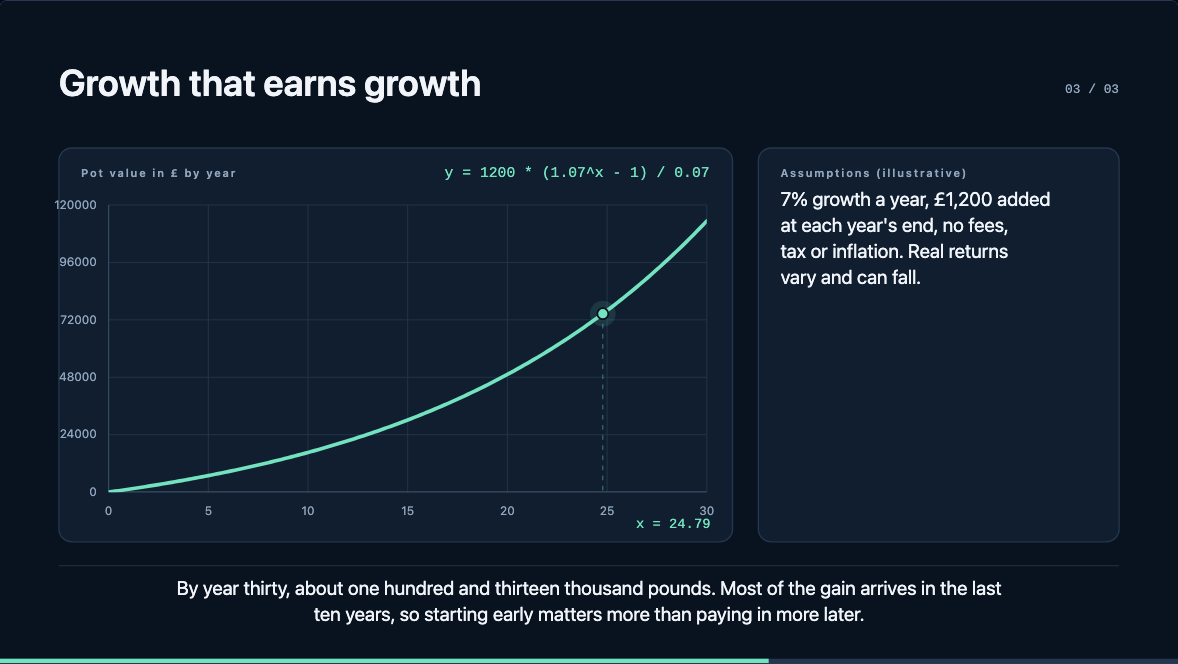
Why £100 a month can grow to £100,000
Compound growth over 30 years, with its assumptions stated, and how much of the pot is growth.
Watch, 41 s (opens in a new tab)
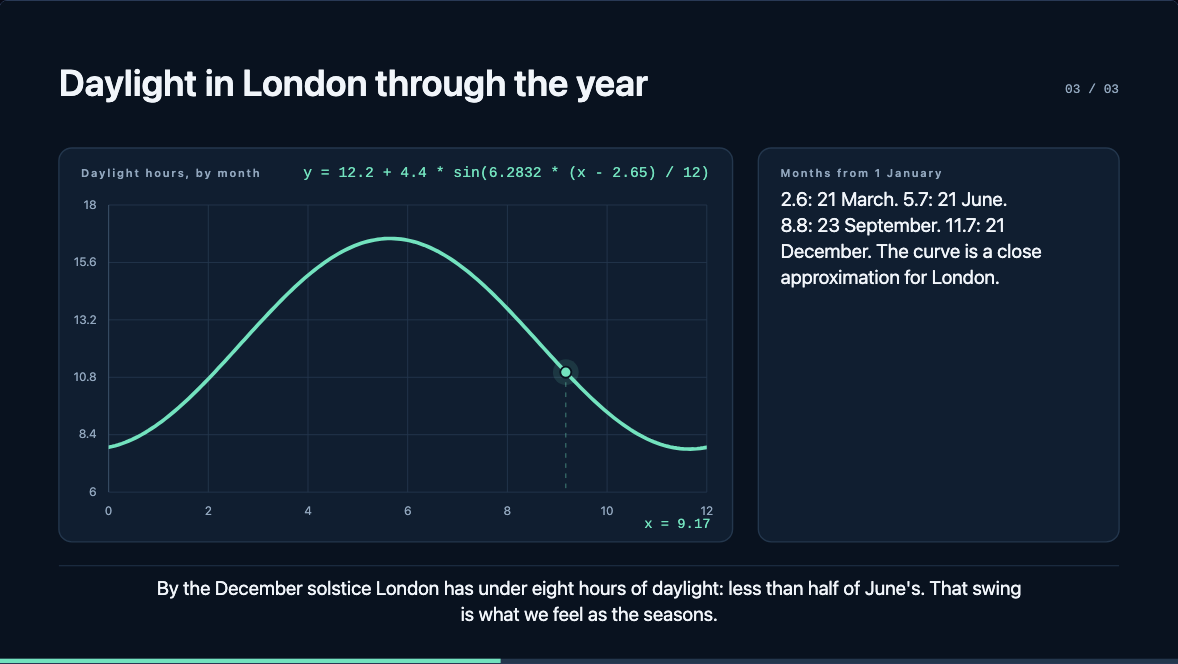
Why we have seasons
Not distance: London's daylight through the year, and the tilt that causes it.
Watch, 50 s (opens in a new tab)
How it works
Your assistant writes the explanation; Elucify voices it, animates it and plays it. The numbers on screen are computed, not drawn.
Ask
In Claude Code, ask for an explanation, or type /elucify:explain and your question. Maths, science, money, history, code: anything with a "how" or a "why".
Watch it build
A link opens straight away. The first part plays within seconds while the rest is still being written: graphs, flowcharts, tables and arrays, narrated.
Share or keep it
Ask for a share link to send to anyone, and withdraw it any time. Download a finished explanation as an MP4 from Chrome or Edge.
Add it to Claude Code
Two commands in Claude Code, in the terminal, the desktop app or your IDE.
/plugin marketplace add oneryalcin/elucify/plugin install elucify@elucify- Run /mcp, choose elucify, then Authenticate.
- In the browser, choose Continue with Google (or continue without an account).
- Ask: /elucify:explain why we have seasons.
Already using it?
See everything you've made, manage share links and check your narration minutes.
Your explanationsFree during the beta
Each explanation can run up to three minutes. When narration minutes run out, explanations still play with captions.
of narration a month, and all your explanations in one place.
of narration a month. Sign in with Google later, from the same browser, to keep what you made.
Questions
Is it free?
Yes, during the beta. There's no payment and nothing to enter beyond a Google sign-in (or none at all).
Which assistants work with it?
Claude Code today, in the terminal, the desktop app and IDE extensions. More assistants are planned.
What can it explain?
Anything that's clearer with a picture: maths and science, money, how things work, processes and flowcharts, data and tables, code. Each explanation is up to three minutes; for bigger topics, ask for a series.
Who can see my explanations?
Only people who have a link. The first link is secret: keep it to yourself. To show others, ask for a share link, which you can withdraw at any time. Explanation pages aren't listed by search engines.
Can I download them?
Yes: a finished explanation has an Export video button that saves an MP4, in Chrome or Edge.
What if an explanation is wrong?
Your AI assistant writes the content, and AI can be wrong; Elucify computes the graphs and tables from what it's given, but it isn't professional advice. If you see something harmful, use "Report this explanation" under it.
Do you track me?
No ads and no tracking scripts. We count anonymous events (such as "an explanation was opened") to see whether Elucify works. See the privacy page.